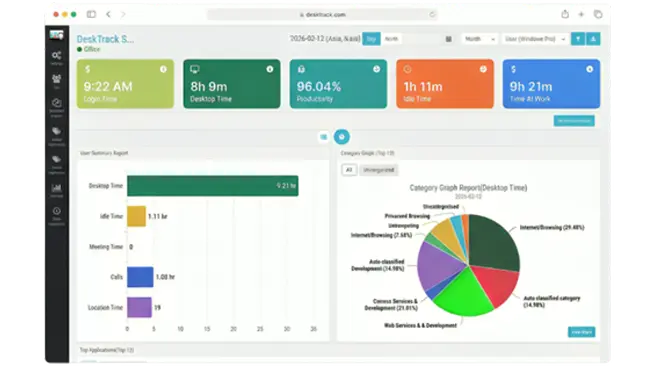
As we have all heard and know, implementing employee time-tracking software reaps many benefits for you, your employees, and overall for your organization. However, there is a catch: you must also know how to implement the software for employee time-tracking correctly. Otherwise, the implementation will be unsuccessful, leading to friction, distrust, and wasted investment.
In this comprehensive guide, we will explore the nuances of time-tracking, why it matters, and how to execute a rollout that empowers your team rather than micromanaging them. This will ensure that you get the maximum benefits of implementing software for time-tracking.
What is Employee Time Tracking Software?
In short, employee time-tracking software or software solutions for tracking the time of employees track desktop hours and activity levels. These are feature-rich tool packages designed to provide a digital log of how work hours are spent within an organization.
Of Whom?
Your employees working in your organization—whether they are in-office, fully remote, or operating in a hybrid model.
Why?
Your employees always work to the best of their performance for you. However, at times, work-time utilization is not optimized. You might find that high-priority projects are stalled while minor tasks consume the bulk of the day. Employee time-tracking software gives you accurate performance reports, based on which you can make on-the-spot decisions for workflow improvement and resource allocation.
How?
You can configure your software for employee time-tracking with your specific Key Performance Indicators (KPIs), objectives, goal settings, performance metrics, and requirements. The software monitors and logs work hours, categorizing time spent on specific apps or URLs, and generates reports based on these predefined settings.
The Core Benefits of Employee Time Tracking
While increased focus is a major win, the advantages of a robust time-tracking system permeate every level of an organization’s hierarchy.
1. Improved Focus and Efficiency
Software solutions provide both manual and automated timesheets. These help you increase the focus and efficiency of your employees because, thanks to the timesheets, your employees concentrate more on the task at hand than the clock ticking. It eliminates the “mental tax” of trying to remember what one did at the end of a long week.
2. Greater Transparency and Compliance
You cannot force compliance, but you can instill self-accountability. When team members know that their progress is being documented, they become more alert and mindful of “time sinks.” This results in more engagement as employees work with more enthusiasm, knowing their hard work is being objectively recorded.
3. Better Growth and Success
All these factors lead to a healthier bottom line. By identifying bottlenecks and “dead time,” managers can streamline processes. This leads to more productivity, better performance, and higher profitability.
4. Fairer Workload Distribution
One often-overlooked benefit is the ability to spot burnout before it happens. Time tracking reveals which employees are consistently working overtime. This allows management to redistribute tasks, ensuring that no single team member is carrying an unsustainable load.
Strategic Steps for Successful Implementation
Implementing software is not just a technical task; it is a cultural one. Not knowing how to properly implement employee time-tracking software will do more harm than good. Follow these steps to ensure a smooth transition.
Step 1: Define Your Goals
Before choosing a tool, ask yourself: What problem are we trying to solve?
-
Are we trying to improve client billing accuracy?
-
Are we trying to identify which tasks are most time-consuming?
-
Are we trying to support a remote work culture? Defining these goals helps you choose the right features and explains the “why” to your staff.
Step 2: Don’t Hurry (The “Soft Launch” Approach)
Your employees are not ready for sudden change. If you implement employee time-tracking software all of a sudden, employees will get confused or feel untrusted.
-
Communicate Early: Announce the change weeks in advance.
-
Be Transparent: Explain that the goal is productivity and resource management, not “spying.”
-
Legality and Ethics: Ensure your tracking methods comply with local labor laws and privacy regulations (like GDPR).
Step 3: Choose the Right Tool (The Implementation Thumb Rule)
The market is flooded with options. We recommend getting the best employee time-tracking software that fits your specific requirements. Consider:
-
Ease of Use: If it’s hard to click “start,” people won’t use it.
-
Integrations: Does it work with your existing project management tools (like Jira, Trello, or Asana)?
-
Reporting: Does it generate the specific data visualizations you need?
Step 4: Create a Clear Time-Tracking Policy
Documentation is your best friend. A clear policy should outline:
-
Which hours need to be tracked.
-
How to handle breaks and private time.
-
Who has access to the data.
-
The consequences (or lack thereof) for “low” productivity scores during the learning phase.
Step 5: Train Your Staff
Since employee time-tracking software is designed with specific interfaces, you need to train your team.
-
Workshops: Hold a brief demo of the software.
-
FAQ Sheets: Provide a “cheat sheet” for common issues.
-
Pilot Group: Start with one department to work out the kinks before a company-wide rollout.
Overcoming Common Implementation Challenges
Dealing with Resistance
It is natural for employees to feel uneasy about monitoring. To combat this:
-
Focus on the Benefits for Them: Mention how it makes requesting raises easier (with data-backed proof of performance) and how it protects them from overwork.
-
Lead by Example: Managers and executives should track their time too.
Ensuring Data Accuracy
Initial data might be skewed as people forget to turn timers on or off.
-
Use Automated Tracking: Features that detect when the computer is idle or when specific apps are opened can reduce manual errors.
-
Review Weekly: In the first month, have managers review logs with employees to ensure everyone is categorizing their time correctly.
Keep Reviewing and Optimizing
It’s mandatory for you to identify whether the software is fulfilling your requirements. An implementation is not a “set it and forget it” event.
-
Monthly Audits: Are the reports actually being used to make decisions?
-
Feedback Loops: Ask your employees what they like and dislike about the tool. If the UI is causing frustration, it might be time to tweak settings or switch tools.
-
Updating Metrics: As your business grows, your KPIs might change. Ensure your software configuration evolves with your company’s objectives.
Advanced Features to Look For
When you are ready to scale, look for these advanced capabilities in your software:
-
Geofencing: For field employees, tracking starts when they enter a job site.
-
Screen Capture: (Use with caution) Useful for training and quality assurance in certain industries.
-
Invoicing: Automatically convert tracked hours into professional invoices for clients.
-
Budget Alerts: Notifications when a project is nearing its allotted hours.
Conclusion
Implementing employee time-tracking software is a powerful move toward a more organized, transparent, and productive workplace. To summarize, these tools are feature-rich packages that monitor work hours to provide real-time reports. By providing clarity on how time is spent, you empower your team to work smarter, not harder.
However, the human element is the most critical factor. By moving slowly, communicating clearly, and training your staff effectively, you transform a “monitoring tool” into a “growth tool.”
Looking for the best employee time-tracking software to start your journey? We recommend DeskTrack for its balance of comprehensive features and user-friendly design. With the right strategy and the right tool, your organization is well on its way to reaching its full potential.
Leave a Reply